
Facilitating Multilingual Groups Online
Topic
 Online Facilitation Tools
Language
Type
Today’s online tools make it easy to connect live with people across the world. However, without thoughtful facilitation, we can reinforce power imbalances instead of truly connecting and collaborating. Whether you’re facilitating a group using one language that’s not everyone’s first language, using interpretation, or some combination, here are tech tools and approaches to increase equity and engagement.
Preparation
Preparation is key, for you and for your participants, to put everyone on level ground and better meet your meeting or training goals.
- Choose software that suits your group. Look for options like multilingual help guides, the ability to switch the language used in the software buttons and menus, simultaneous interpretation features, chat translation features, and closed captioning.
- Send materials in advance, sharing the agenda and any materials in all your official languages at the same time.
- Be transparent about the session’s dominant language (if applicable), and any additional language support that will be included, such as interpretation.
- Include connection instructions in all needed languages. If the help guide for the software is available in multiple languages, make that clear and share links.
- Provide international call-in numbers, if needed.
- If working with an interpreter(s), share materials with them in advance, answer any questions about your terminology or your software, and agree on any practices you may need for the session, including how to communicate or set-up switching interpreters and how you will handle chat.
- Do a run-through, if time, to get used to both your content and the software.
- Request a list of participants in advance (if possible) with information about language needs. This will support you in the creation of breakouts, sharing of materials, and the pacing.
Making Visuals
Including written instructions for activities increases comprehension across languages, so design slides or a document you can screen share during your session. When making your visuals:
- Include simple instructions for all activities
- Include all present languages, if possible, in all your visuals.
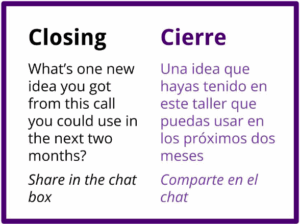
- Use consistent formatting and color, by language, to make it easy for participants to follow their preferred language throughout the session. For example, always putting language A on the left and language B on the right and language A in black and language B in purple. For maximum accessibility, don’t rely on color alone.
Other Tips for Multilingual Online Spaces
Here are some tips, regardless of the software you use, to increase participation across languages in your session.
- Clarify norms and expectations up front and be prepared as a facilitator to support the norms you have set.
| Suggested norms to implement in multilingual meetings, whether you have live interpretation or not. | |
| Norm | Notes |
| Speak only one person at a time | This allows for better comprehension and it prevents the interpreters from having to choose to interpret one voice over the other. |
| Speak slowly and clearly | You can ask the group to use a visual signal the group agrees on for asking the speaker to slow down |
| Raise your hand and wait to be recognized before speaking | This allows the facilitator to make sure that each person has had enough time to be interpreted and everyone has equal opportunity to speak. TIP: You can have people to type * in the chat if your software doesn’t allow for hand-raising. |
| Communicate in the chat or out loud | The facilitator should explicitly offer different options for participants to communicate so they choose what’s more accessible. |
| Make space when clarification is needed | Sometimes people may need to ask questions or check in with someone in their own language about what’s happening outloud or in the chat. |
| Share what is going on | For example when there is talking in a language other than the dominant language in the meeting, “[side conversation…] I was asking Sean to explain what that word meant.” |
- Assign the role of “language keeper” to someone in your group to keep an eye on the use of language and the balance of participation across native and non-native speakers of the dominant language in the meeting. This person might step in to suggest changes mid-session, or provide feedback afterwards to help you evaluate and improve.
- Use written text instead of only audio. This supports people working in a non-native language to be understood and to understand others. To take advantage of this, include activities such as collaborative whiteboard brainstorms and text chat discussions. Be sure to give plenty of time for people to read and respond, understanding that some people may be using translation tools or just need more time to read and write than others.
- Activate subtitles in your software as well, if that is an option.
- Engage and read the group with frequent, quick polls that can be answered with a “Yes” or “No” or a number in the chat box. Whenever possible, ask these questions in the multiple languages in the room, outloud and/or on your presentation slides.
- Use various means to track participation and make sure everyone has had enough time and support. For example:
- Use methods like “choose who is next” or a go-around to ensure everyone is asked to respond to a prompt.
- Track participation in a text chatto ensure everyone has responded to a chat question before moving on.
- During a collaborative writing activity, keep an eye on the number of responses compared to the number of participants, or watch the number of cursors on screen if using Google Docs. Does it look like everyone has responded?
- Ask people if they are ready to move on before going to the next activity. Use text, webcamera (thumbs up/down) polling tools, or emojis built into your software to get a response.
Language Interpretation in Online Meetings and Trainings
Simultaneous audio translation (“United Nations-style”) is recognized as the best method for interpreting during meetings. It allows people to communicate freely in their native or preferred language, and doesn’t cause as much delay as consecutive interpretation. New tools make this more feasible in online meetings and trainings. Here are some tips for using simultaneous interpretation:
- Provide clear support up-front to make sure all participants are able to communicate in their preferred language. Build in some extra time in your agenda to make sure everyone is able to hear their preferred channel or properly see the Sign Language interpreter, as applicable.
- Make the expectations clear at the beginning of the session. What kind of interpretation will you have (consecutive, simultaneous)? What languages are included?
- Clarify that the role of the facilitator includes making space for all participants, and that includes looking for when the group needs a pause to get everyone on the same page and make sure everyone can contribute.
- The ideal interpreting team for any virtual meeting more than 30 minutes includes two interpreters and one person (ideally bilingual, but not necessary) who can manage the technical aspects of virtual interpreting. For instance, many times there is an audio channel for Language A and a second audio channel for Language B, and it’s useful to have one person who can troubleshoot any issues that come up communicating between the two channels, such as to flag for facilitators who are only on Language A channel that there is an issue on the other channel, etc.
- Have clarity about how and when to interpret audio or translate text (for example chats or whiteboard comments). Interpreters should not be expected to translate voice and text at the same time. Some options are:
- Have a native speaker of each language read the chats out loud so they’re interpreted. (This could be facilitators or participants.)
- Have a second translator specifically to focus on written translation.
- If you have two interpreters, while one of them is “on the mic” doing spoken interpreting, the other can focus on written translation.
- If there are Sign Language interpreters, agree on how they will signal to you when they’re switching and if possible, pin their video (if your software allows) so they’re easy to locate on screen.